

Most companies run on a patchwork of systems that don’t talk to each other. This creates bottlenecks, wastes time, and costs money.
At Clouddle, we’ve seen firsthand how the right technology integration strategies transform operations. This guide walks you through assessing what you have, building a realistic plan, and handling the obstacles that pop up along the way.
Assessing Your Current Technology Infrastructure
What Systems Are Actually Running Your Business
Start by listing every single system your organization uses. Not the ones you think you use-the ones people actually log into daily. Most organizations run 15 to 20 active platforms when they expected five. Spreadsheets count. Legacy databases count. Cloud apps employees installed without IT approval count. This inventory matters because you cannot fix what you do not see. Spend two weeks documenting each system: what data it holds, who accesses it, how often it updates, and whether it connects to anything else. Ask your finance team which systems touch revenue.
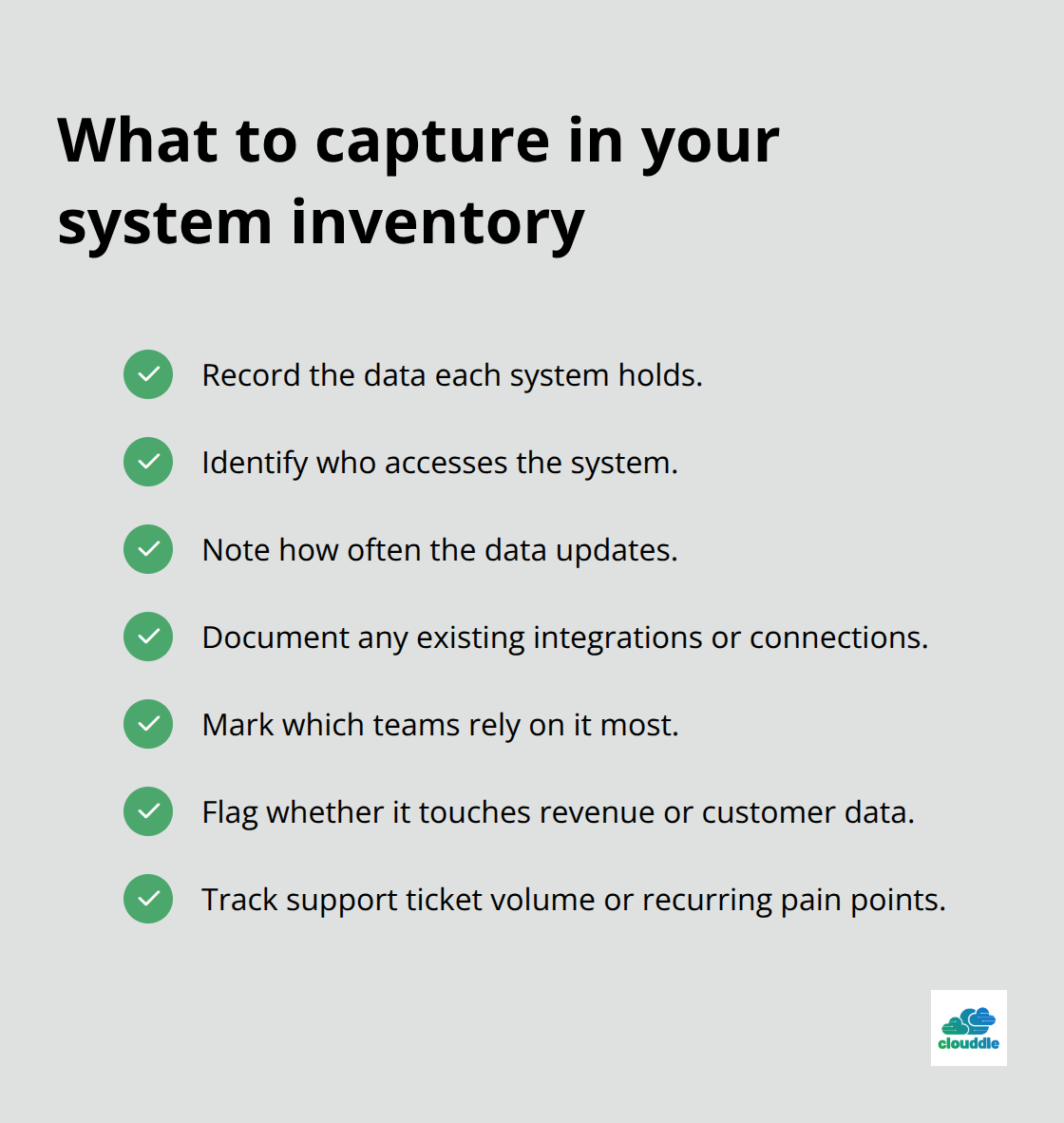
Ask operations which systems touch customer data. Ask IT which systems cause the most support tickets. These conversations reveal which systems actually matter to your business versus which ones consume budget without delivering value.
Finding Where Systems Fail to Connect
Once you have your inventory, map the data flows between systems. Where does customer information live? Does it exist in your CRM, your billing system, and your helpdesk as three separate copies? That redundancy costs money and creates errors. Look for manual handoffs-places where someone exports data from one system and imports it into another. A manufacturing company discovered their team was manually re-entering order data from their ecommerce platform into their ERP system three times daily. That single inefficiency consumed 3 hours each day of manual updating. Identify which systems should talk to each other but don’t. Your CRM should feed data to your accounting software. Your inventory system should update your sales platform. Your HR system should sync with your access controls. When these connections don’t exist, you get siloed data and delayed decisions. Check whether your existing systems support API integration or if they require custom bridges. Some older platforms refuse to integrate cleanly, and that constraint matters now.
Measuring What’s Actually Slowing You Down
Performance metrics reveal the real cost of your current setup. Measure how long it takes to generate a financial report. How long does it take to onboard a new customer from first contact to system access? How many manual steps exist in your core workflows? Document system downtime over the past six months-not just total hours, but the business impact. One hour of downtime for your booking system costs differently than one hour of downtime for your internal chat platform. Identify your slowest processes and their root causes. Is your reporting delayed because data updates only once daily? Is customer service slow because agents must switch between four different screens to answer one question? Is billing inaccurate because data doesn’t sync automatically? These measurements become your baseline. They prove the problem exists in concrete terms, and they give you numbers to track improvement against after integration happens.
With your current state mapped out, you now have the foundation to build a realistic integration plan that addresses your actual bottlenecks rather than theoretical ones.
Building Your Integration Roadmap
Your audit revealed the problems. Now comes the hard part: fixing them without breaking operations. The biggest mistake companies make is treating integration as a single event rather than a structured sequence. You need a roadmap that prioritizes ruthlessly, sets realistic deadlines, and allocates resources where they actually matter.
Rank Systems by Business Impact, Not Complexity
Start by ranking your systems based on direct business impact, not IT complexity. Which system, if it failed today, would cost your company the most money within the first hour? That system gets integrated first. A healthcare facility discovered their patient scheduling system affected revenue within minutes of downtime, while their internal knowledge base could be offline for days without financial impact. That distinction determined their integration sequence.
Structure Your Integration Across Three Phases
Map three phases across your timeline: zero to three months for establishing stable baselines and enabling cross-team collaboration, three to six months for aligning systems and eliminating redundancies, and six to twelve months for consolidating your systems of record into a single source of truth. This structure prevents the chaos of simultaneous integrations while maintaining momentum.
Allocate Resources to People First
Resource allocation determines success more than technical capability. You need three types of people: an IT program manager who owns the timeline and accountability, data engineers who handle the technical connections, and a change management person who prepares your teams for workflow shifts. Many companies skip the change management role and watch adoption fail despite perfect technical execution. Providing modern tools, setting coding standards, and using version control systems helps minimize bottlenecks and encourages collaboration.
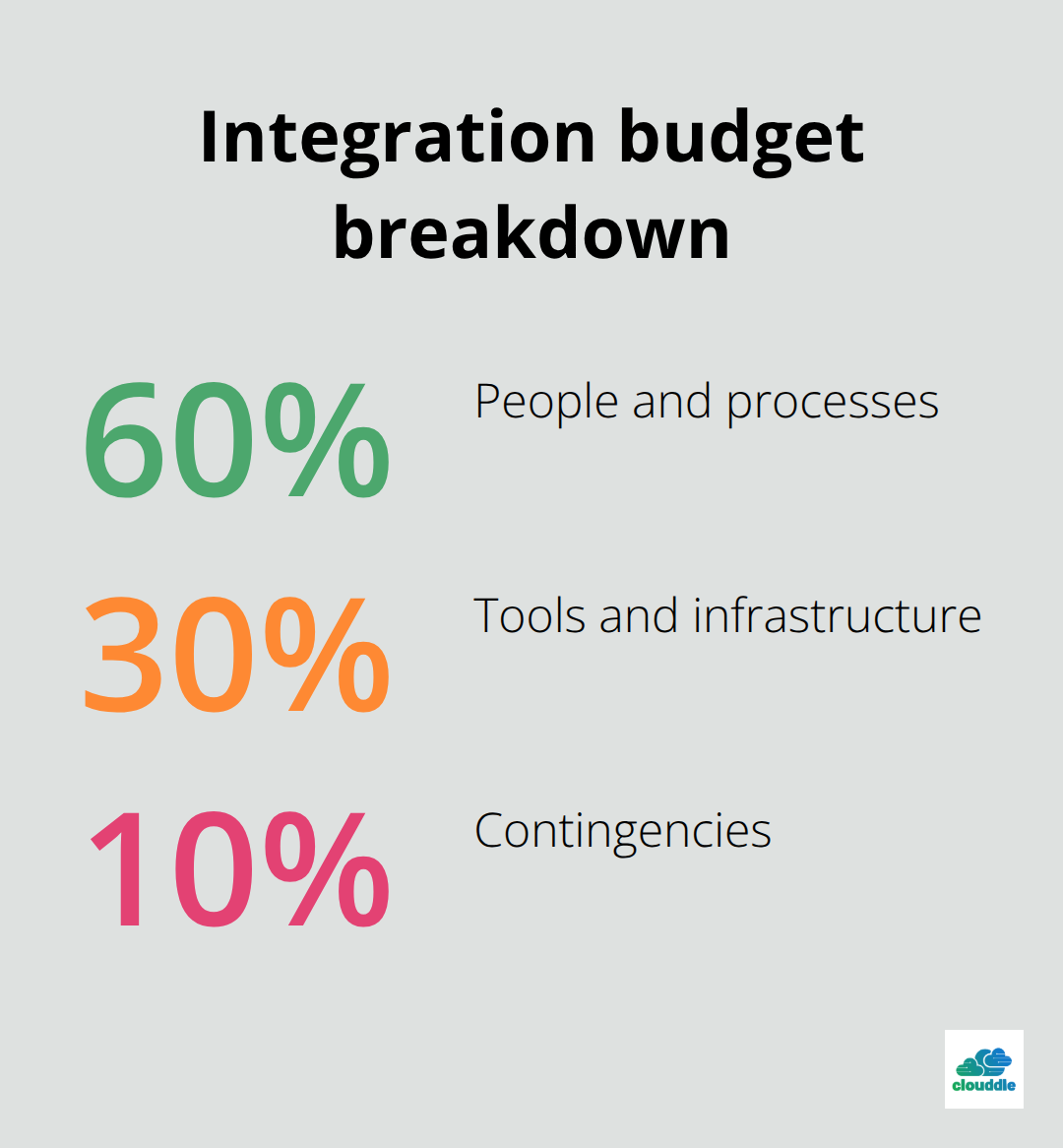
Budget roughly 60 percent of your integration investment toward people and processes, 30 percent toward tools and infrastructure, and 10 percent toward contingencies. If your total integration budget is $200,000, spend $120,000 on staffing, $60,000 on software and integration platforms, and keep $20,000 for unexpected obstacles.
Test Your Approach on a Pilot First
Start with a pilot program on a non-critical system or department. Test your integration approach, your training materials, and your support processes on a smaller scale first. This reduces risk and gives you real data about what works before you touch your revenue-generating systems.
Define Goals and Assign Clear Ownership
Set specific six-month goals with measurable outcomes: reduce report generation time from three days to four hours, cut manual data entry by 40 percent, or decrease customer onboarding from five days to one day. Assign clear ownership of each goal to a specific person, not a committee. Without that accountability, integration efforts drift and timelines slip. With your roadmap in place and resources committed, you now face the obstacles that emerge during execution-obstacles that derail most integration projects if you don’t prepare for them.
Overcoming Common Integration Obstacles
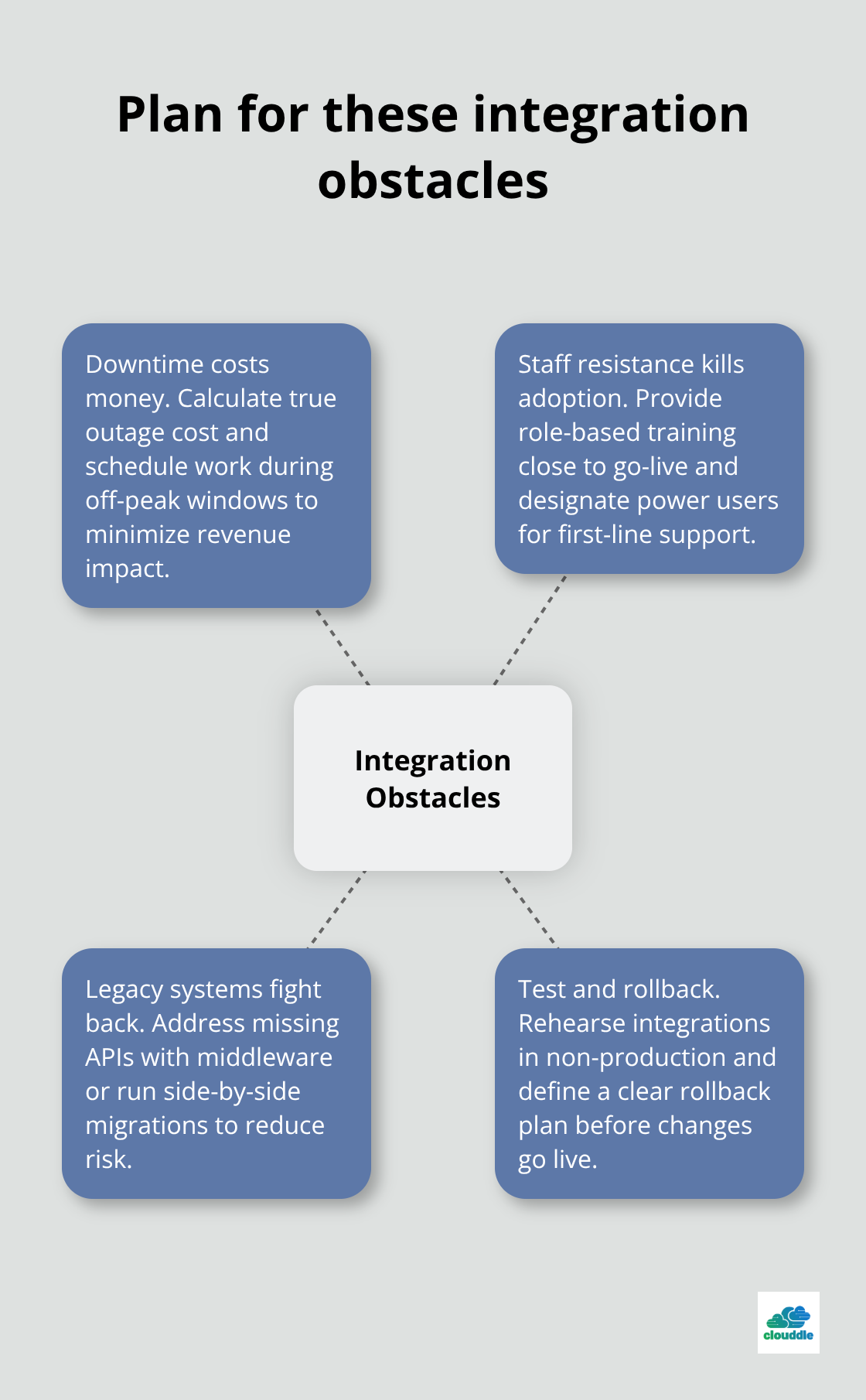
Integration projects fail most often not because of technical problems but because companies underestimate three operational realities: downtime costs money, staff resistance kills adoption, and old systems fight back harder than anyone expects. Addressing these obstacles before they emerge separates successful integrations from the ones that get abandoned halfway through.
Schedule Integration During Windows That Cost Less
Downtime during integration is unavoidable, but when it happens matters enormously. A retail company integrated their point-of-sale system with their inventory platform during their slowest sales period in January rather than their peak season in November. That single decision reduced revenue impact from an estimated $50,000 to under $5,000. Calculate your actual downtime cost by multiplying your hourly revenue by the expected outage duration, then add lost productivity for staff who cannot work. Most companies discover their true downtime cost far exceeds their software licensing cost, which changes integration priorities instantly.
Schedule integration work during off-peak hours whenever possible. If your business operates 24/7, negotiate with your integration partner to run critical migrations at 2 AM on a Tuesday rather than noon on a Wednesday. Test every integration step in a non-production environment first. Your team should run through the entire process twice before touching live systems. Many integration failures stem from untested assumptions about data formats, connection speeds, or system behavior. One financial services company discovered during testing that their legacy database returned dates in a format their new system could not parse. Catching that in a test environment cost two hours of troubleshooting. Missing it in production would have cost two days and significant data corruption.
Build rollback procedures before you need them. Define exactly how you will revert to your previous system state if something fails. Document which data gets backed up, how long restoration takes, and who makes the decision to rollback. Having this plan written down prevents panic decisions during an actual crisis.
Train People Before Systems Go Live, Not After
Staff resistance kills more integration projects than technical failures. Employees fear new systems will make their jobs harder or eliminate their positions. Training three weeks before launch does almost nothing because people forget most of what they learned before they actually use the system. Instead, start training four weeks before launch with hands-on practice in your test environment, then run a second training session one week before launch focused on troubleshooting and edge cases.
Make training specific to each role. Your accounting team needs different training than your sales team. A hospital broke training into clinician sessions, administrative sessions, and billing sessions, which cut training time by 40 percent while improving comprehension. Assign power users in each department who become the first-line support for their teams. These people attend deeper training sessions and act as mentors for colleagues struggling with the new system. Organizations with designated power users saw 40 percent faster adoption compared to organizations relying only on formal training sessions.
Create documentation that matches how people actually work, not how the system theoretically works. Screenshots, video walkthroughs for the three most common tasks, and a simple troubleshooting guide help far more than 200-page manuals. Make this documentation available during the first month when questions peak. Support your teams heavily in the first 30 days after launch. Your help desk should expect a spike in tickets and should staff accordingly. One manufacturing company increased their help desk capacity by 50 percent for the first month after integration, then reduced it back to normal levels once staff became proficient. That temporary investment prevented frustration from spiraling into system rejection.
Legacy Systems Require Different Integration Approaches
Old systems often cannot integrate cleanly because they were built before modern integration standards existed. Your 15-year-old custom accounting software probably lacks an API. Instead of forcing integration, you have two realistic options: build custom middleware that translates data between the old system and new systems, or run legacy and modern systems side-by-side temporarily while gradually migrating data.
Custom middleware costs money upfront but lets you keep both systems operational during transition. One insurance company built middleware that extracted data from their legacy policy management system nightly and pushed it to their new CRM. The process took six months to build and cost $45,000, but it eliminated manual data entry and reduced errors by 95 percent. Running systems side-by-side works when you have time and resources. Your team maintains both the old and new system for three to six months, gradually migrating work to the new system as confidence builds. This approach costs more in operational overhead but eliminates the risk of a catastrophic failure.
Choose which legacy systems actually need integration and which ones can simply be retired. Not every old system deserves integration investment. If a system holds historical data that people rarely access, archive that data and retire the system rather than spending months integrating it.
Conclusion
Technology integration strategies succeed when you treat integration as a structured process rather than a one-time event. The companies that transform their operations audit ruthlessly before building, prioritize based on business impact rather than technical convenience, and invest heavily in people and change management alongside technology. Your integration roadmap should span six to twelve months minimum, with the three-phase approach building momentum while maintaining stability through early wins, redundancy elimination, and systems consolidation.
A cohesive technology environment delivers concrete benefits that extend far beyond the initial integration effort. Your teams spend less time switching between systems and more time on work that generates revenue, while your leaders make decisions based on current data instead of yesterday’s reports. One manufacturing company reduced their monthly IT support tickets by 35 percent within six months of completing integration, freeing their IT team to focus on strategic projects rather than firefighting.
Start your implementation immediately with a complete audit of your current systems, then build your phased roadmap with clear ownership and measurable goals. If your organization operates in hospitality, multi-family housing, or senior living, Clouddle provides managed IT and networking solutions that simplify technology integration through a Network as a Service approach combining networking, security, and connectivity without requiring upfront capital investment.